





Feature available with the Enterprise Plan Policies are the highest-level routing control in the AI Router. A policy bundles model routing, evaluators, and budget limits into a single named configuration that can be invoked directly from your API calls.Documentation Index
Fetch the complete documentation index at: https://docs.orq.ai/llms.txt
Use this file to discover all available pages before exploring further.
Use cases
Policies are most useful when you need to enforce consistent model access, compliance checks, and spend limits across a team or project from a single place.Enforce workspace-wide safety with a spending cap
Enforce workspace-wide safety with a spending cap
A global policy that routes all workspace traffic through a single approved model, runs a safety Evaluator on requests, and enforces a token limit to cap spend across every project.
Detect PII on EU document workloads
Detect PII on EU document workloads
Routes EU document workloads to a designated model and samples every request through a PII Evaluator to detect sensitive data before it reaches the model.
Lock a testing environment to a cheaper model with GDPR checks
Lock a testing environment to a cheaper model with GDPR checks
Scopes a policy to the testing environment, locks it to a cost-effective model, attaches a medical advice Evaluator, and caps traffic at 1000 requests per minute so test workloads never exceed approved spend.
Keep costs down across all projects
Keep costs down across all projects
A global policy that attaches a quality Evaluator and enforces request and token limits, so quality is checked and spend stays controlled across all projects.
Enforce US PII compliance in production
Enforce US PII compliance in production
Runs a US-specific PII Evaluator on all production traffic from a single policy.
Give a support team access to approved models within a budget
Give a support team access to approved models within a budget
Scopes the support project to a specific model, attaches a cost Evaluator, and enforces a monthly budget limit so the team can only use what has been approved.
How policies work
Policies sit at the top of the routing hierarchy:- When a policy with a model configured is matched, Routing Rules are bypassed.
- If the policy has no model configured, the router falls back to Routing Rules and applies the highest-priority matching rule.
- Any Guardrail Rules that match the request are still evaluated and enforced, regardless of which policy is active.
Visibility
- Global policies: visible to workspace administrators only.
- Project policies: visible to all members of the scoped project.
Creating a policy
From the Policies list, click Add New Policy. A panel opens on the right with the following fields.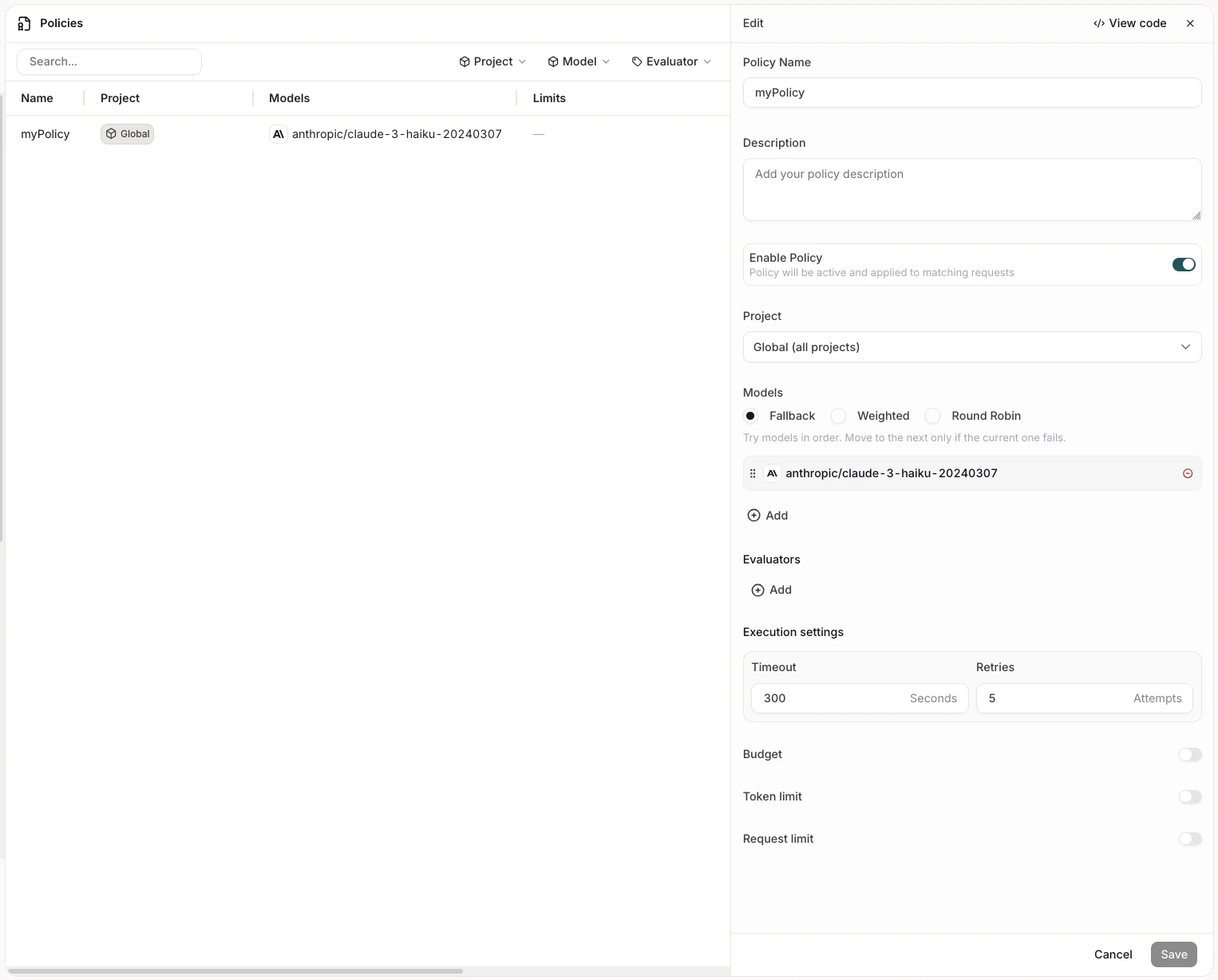
General
| Field | Description |
|---|---|
| Policy Name | A display name for the policy. Used as the identifier when invoking the policy in code. |
| Description | Optional context for other administrators. |
| Enable Policy | Toggle to activate or deactivate the policy without deleting it. |
| Project | Scope of the policy. Global (all projects) applies the policy workspace-wide. Selecting a specific project restricts the policy to calls made within that project, and only entities belonging to that project are evaluated. |
Providers and traffic weight
Defines which models handle traffic and how requests are distributed across them. Models sets the distribution strategy:- Fallback: Requests go to the primary model. If it fails, the next model in the list is tried.
- Weighted: Traffic is split across models by percentage weights you assign.
- Round Robin: Requests rotate evenly across all configured models.
Evaluators
Attach one or more Evaluators to gate requests through the policy. Click Add to select from the evaluators available in the scoped project. Each evaluator has a configurable Sample Rate: the percentage of requests that are evaluated. Unlike Guardrail Rules, evaluators attached to a policy are not condition-triggered. They run on every sampled request.Execution settings
| Field | Description |
|---|---|
| Timeout | Maximum time in seconds allowed for the entire policy to complete. If the timeout is reached, the policy execution stops. |
| Retries | Number of times the policy retries on failure before giving up. |
Budget
The Budget section contains three independently toggleable limits. Each has a configurable period: Hourly, Daily, Weekly, or Monthly.| Limit | Field | Description |
|---|---|---|
| Max spend | Amount in USD | Maximum dollar spend per period. |
| Token limit | Max tokens | Maximum number of tokens consumed per period. |
| Request limit | Max requests | Maximum number of API requests per period. |
Invoking a policy
Reference a policy in your API call usingpolicy/<policy-name> as the model value. The name must match the Policy Name you set when creating the policy.
mypolicy with the name of your policy.